
MCP Finally Clicked: It Is Plumbing. Trust Is The Product.
Follow ML-Affairs On LinkedIn
Open the ML-Affairs page and follow it directly, or use the LinkedIn widget below.
This revision sharpens the explanation that finally made MCP click for me: the model does not execute the provider API call, and every AI application should not have to reimplement provider-specific glue for itself. The MCP client carries a standard protocol call; the MCP server is the reusable execution boundary where provider knowledge can live.
I am joining the MCP party a little late.
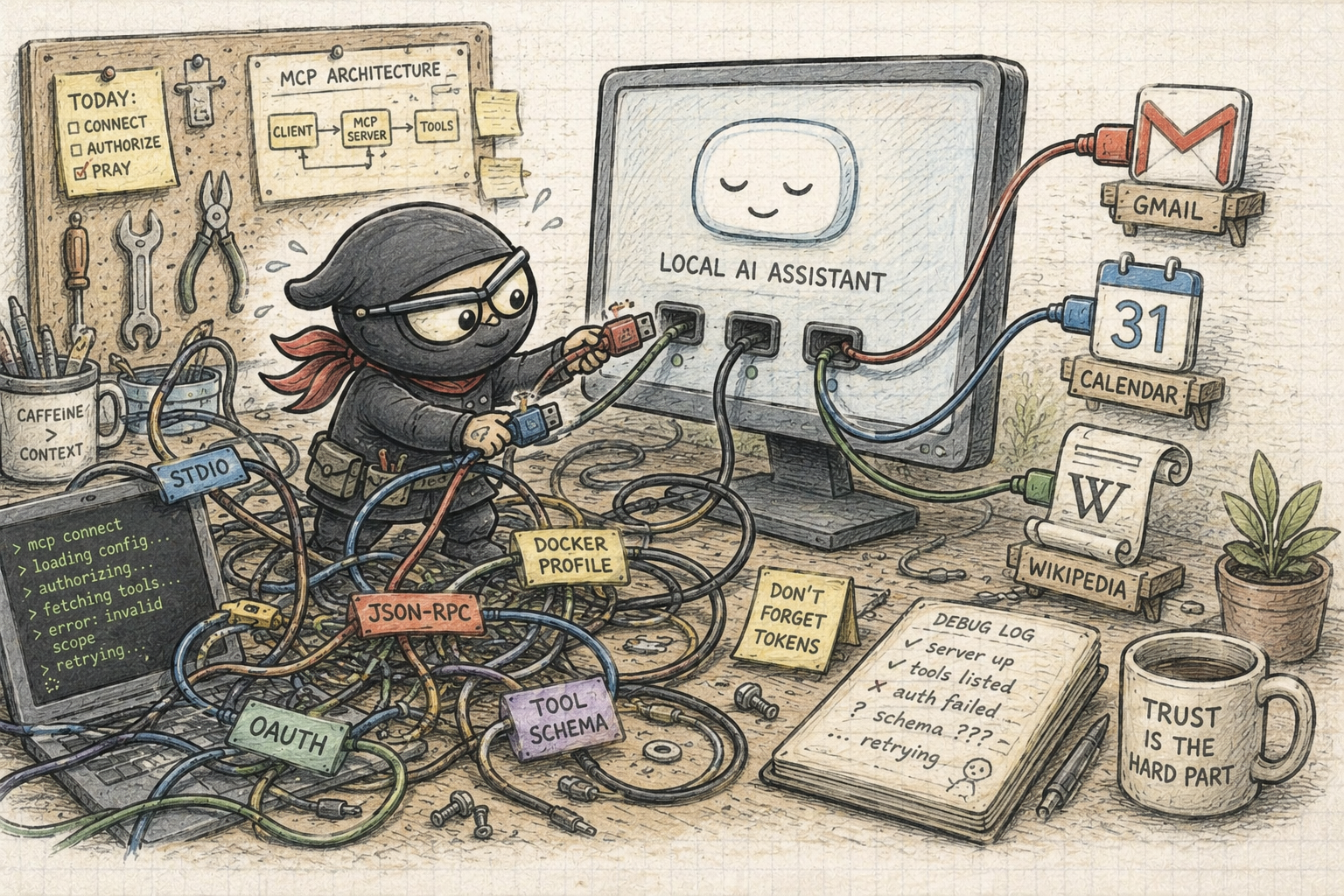
Not because I ignored it completely, but because the first pass did not feel as obvious to me as the enthusiasm around it suggested. There was a lot of jargon. The setup path had more moving pieces than I wanted. The whole business of piping messages through local processes, gateways, containers, profiles, and JSON schemas felt slightly tedious before it felt useful.
That is usually a sign that I do not understand something existentially yet.
I do not just want to know what command to run. I want to understand why the thing had to exist in the first place. What problem was the ecosystem trying to solve? What else was happening around the same time? Which part is genuinely new, and which part is just an old integration problem with a better name?
So this post is mostly written for the version of me that needed the explanation to be digestible.
Hopefully it helps someone else too.
A recent explanation helped me because it moved the argument away from “MCP versus APIs” and toward the better question: where does the execution layer live?
My conclusion after working through it is simple:
MCP is valuable exactly where it is boring.
It standardizes reusable connector execution. It does not absolve the host application from trust, routing, approval, or evidence discipline.
Why MCP Had To Happen
LLMs started as text systems.
You sent text in. You got text out. That was already useful, but it had an obvious ceiling. A model could explain how to search email, but it could not search your email. It could suggest a calendar event, but it could not inspect your calendar. It could tell you which shell command might help, but it could not safely inspect the repository unless the surrounding application gave it a controlled way to do so.
Then AI applications started adding tools.
The pattern itself was sensible. The model should not directly touch the outside world. It should ask for help, and the host application should mediate the action.
The important detail is ownership: the model proposes, the host validates and routes, the MCP server executes the provider-specific work, and the host records and shapes evidence before the final answer is written.
The problem was not the loop. The problem was glue code.
Every serious AI application began needing connectors: Gmail, Slack, GitHub, files, calendars, databases, browsers, search, internal systems. Each connector needed provider-specific setup, credentials, scopes, pagination, rate-limit handling, argument schemas, error normalization, result shaping, and model-facing descriptions.
That glue code has an unpleasant habit: it looks small when you write one connector and becomes architectural weight when every host application repeats it differently.
Gmail needs one shape of OAuth, search, labels, snippets, and attachment handling. Slack needs another shape of channels, threads, users, bot permissions, and message posting. GitHub, calendars, browsers, databases, and files all bring their own little integration worlds. Then each AI host still has to translate those worlds into something a model can discover and call.
That is how you end up with a connector zoo, and then with glue code proliferating around the zoo.
The value of MCP is not that API calls disappear. The value is that the provider-specific execution layer can stop living inside every AI client.
Without a standard boundary, each assistant application tends to carry the same client-side burden: authentication ceremony, endpoint chaining, retries, pagination, error handling, result cleanup, and little translations like “incident channel” into a Slack channel ID. With MCP, that provider knowledge can live once inside a Slack, Gmail, Jira, or internal-system MCP server, while each AI host speaks the same protocol to discover and call it.
The timing matters too. Around the same period, the conversation moved from chatbots toward agents, coding assistants, desktop assistants, local runtimes, and tools that could act on real systems. Models were getting better, but they were still isolated from the places where useful work actually happens. A coding assistant needs the repository. A personal assistant needs calendar and email. A business assistant needs internal documents, tickets, dashboards, and databases.
That world cannot scale on every app hand-rolling every connector and every connector contract.
Anthropic introduced the Model Context Protocol on November 25, 2024 as an open standard for connecting AI assistants to systems where data lives. The official MCP docs use the USB-C analogy: one standard connection shape instead of a different cable for every device. That analogy is imperfect, but useful enough.
The deeper point is this:
MCP exists because every AI app should not have to reinvent the same connector protocol differently.
Before MCP, connecting an assistant to external systems usually meant each host application had to invent its own integration language. MCP gives those integrations a common shape, so the glue code can move behind a more standard server boundary instead of leaking into every product in a slightly different form.
The Jargon That Tripped Me
The words are part of the problem, so it is worth clearing them before drawing the system.
In MCP language, a callable operation is often called a tool. In product language, that can be confusing. A normal user does not think “Gmail has 17 tools.” They think “Gmail is a tool, and it can do several things.”
I now prefer this vocabulary:
- AI application / MCP host: the product boundary that owns the assistant experience and coordinates one or more MCP server connections.
- Harness / agent control layer: the host-side component that owns routing, validation, approvals, audit, and evidence shaping.
- Model runtime or provider: where inference happens, such as LM Studio, Ollama, Claude, or another hosted model API.
- MCP client: the per-server connection component the host uses to talk to an MCP server.
- MCP server: the process across the protocol boundary that exposes external functions through MCP and normally owns the provider-specific execution behind them.
- MCP Manager: software that helps install, run, group, configure, or authorize MCP servers.
- Product tool: a user-recognizable capability such as Gmail, Calendar, Wikipedia, Search, or Slack.
- Function: one executable operation inside that product tool, such as
search_messages,list_events, orget_summary. In many cases, the function eventually becomes an ordinary API call.
That distinction sounds pedantic until you build the UI.
If an MCP Manager profile shows Gmail, Slack, and Wikipedia, that is not the same thing as telling the model it can call every function from every server. It only means those servers are visible or available through the manager.
Visibility is not execution.
The MCP client is not the Slack integration, the Gmail integration, or the Jira integration. It is the host-side protocol connection. The provider-specific integration belongs behind the provider’s MCP server.
Once that vocabulary is less slippery, the mental model becomes much easier.
A Tool Is Usually An API Call Behind A Server Boundary
This is the missing layer in many MCP explanations.
Before MCP, there were already APIs.
An API is a contract that lets one software system ask another software system to do something. In a REST API, that contract usually looks like HTTP endpoints, methods, parameters, authentication, and JSON responses. A human developer reads the documentation, understands the authentication model, writes client code, handles errors, and decides how the result should be used.
For example, a simple weather integration might eventually call an HTTP endpoint shaped roughly like this:
GET /weather/current?city=London&units=metric
Authorization: Bearer ...
That is not an AI concept. It is normal application integration.
The API exposes an endpoint. The application code owns the orchestration.
This is why “why not just give the model the OpenAPI spec?” is not a complete answer.
API documentation can tell a model what endpoints exist. It does not provide the execution layer. Something still has to store credentials, choose the right endpoint sequence, translate user language into provider IDs, handle pagination, normalize errors, retry safely, and turn the raw response into evidence the host is willing to show back to the model.
You can build that layer directly. For a one-off integration, that may be the pragmatic choice. But once multiple AI applications need the same provider, the direct approach starts turning every client into a small integration platform.
What MCP changes is the consumer of that contract. Instead of only giving a human developer an endpoint to wire manually, the MCP server exposes a capability in a form that an AI host can discover, describe to a model, validate, and invoke.
The same weather capability might become a model-readable tool description:
{
  "name": "get_current_weather",
  "description": "Get the current weather for a city.",
  "inputSchema": {
    "type": "object",
    "properties": {
      "city": {
        "type": "string",
        "description": "City name"
      },
      "units": {
        "type": "string",
        "enum": ["metric", "imperial"]
      }
    },
    "required": ["city"]
  }
}
Then, when the user asks “what is the weather in London?”, the model does not call the weather provider directly. The host gives the model a constrained tool contract. The model proposes a structured call:
{
  "tool": "get_current_weather",
  "arguments": {
    "city": "London",
    "units": "metric"
  }
}
The host-side harness validates that request. The MCP client sends it to the weather MCP server. The server translates the tool call into the provider-specific API request, handles the provider response, and returns structured data back across the MCP boundary.
That is the execution boundary. The MCP client transports a standard tools/call request. The MCP server knows how to perform the provider operation.
That is the concrete shape of the idea.
The model sees the constrained, structured tool contract. The server still deals with the ordinary provider API behind the boundary.
The model does not execute the API call.
It proposes a structured tool call. The MCP server executes the provider work.
This is also why MCP can feel underwhelming when inspected closely.
Under the hood, many MCP servers are wrappers around ordinary APIs. A GitHub server may call the GitHub API. A Slack server may call the Slack API. A Gmail server may call the Gmail API. The novelty is not that APIs suddenly exist. The novelty is that the assistant ecosystem gets a standard way to discover capabilities, see their schemas, call them with structured arguments, and receive structured results.
In other words:
- REST API: "Here are endpoints. Developer, wire the integration and orchestration yourself."
- MCP: "Here are capabilities in a form an AI host can expose to a model and invoke through a standard protocol."
That distinction matters because it prevents two bad interpretations.
The first is over-selling MCP as if it replaces APIs. It does not. It often sits on top of them.
The second is under-selling MCP as just an API wrapper. It is often a wrapper, but the wrapper is doing something specific: turning provider-specific operations into a common, discoverable, schema-backed tool interface for an LLM runtime, while centralizing the execution code that would otherwise be repeated across clients.
The Simplest Mental Model
Here is the version that finally made it click for me.
An MCP server is the adapter that exposes those capabilities through the MCP protocol. It is also the place where provider-specific execution code can live.
It is called a server because, from the assistant’s point of view, it serves capabilities over a protocol boundary. That does not mean it has to be a public web server running somewhere on the internet. It can be a local process, a Docker container, or a small service launched by the host. External here means outside the host boundary, not necessarily remote.
The practical pattern is usually one MCP server per capability provider.
A Gmail MCP server is the Gmail-side adapter. It can expose many callable functions:
search_messageslist_labelsget_threadcreate_draftsend_message
A Slack MCP server is the Slack-side adapter. A filesystem MCP server is the local-files adapter. The server is the boundary around the provider; the functions inside it are the individual operations. A single high-level function may still hide several low-level API calls: find the channel, resolve its ID, fetch history, page through results, expand user IDs, and return a cleaner result.
Most of the time, the server still wraps something ordinary:
- a Gmail MCP server wraps the Gmail API
- a Slack MCP server wraps the Slack API
- a filesystem MCP server wraps local files
- a Wikipedia MCP server wraps Wikipedia data
In MCP terms, the AI application is the MCP host.
For this post, think of the host as the product boundary: the assistant UI, conversation state, model interface, harness, and MCP clients all live on the host side. The actual model may be local or hosted; the host is the application that calls it. The harness is not a separate MCP role. It is the part of the host I care about because it owns routing, validation, approvals, audit, and evidence shaping.
An MCP client is the host-side protocol connection to one MCP server. If the host talks to Gmail, Slack, and the filesystem, it may maintain separate MCP client connections for each server. Across that protocol boundary sit the MCP servers.
routing, policy, approvals, audit, evidence
calls local runtime or hosted model API
host-side connections to servers
search, labels, threads, drafts, send
channels, threads, messages
read, search, metadata
That means MCP gives the host and server a repeatable protocol shape around capabilities that may ultimately be API calls:
- Discovery: the host, through its MCP client, can ask which functions the server exposes.
- Description: the server returns names, descriptions, and argument schemas.
- Exposure: the host decides which discovered functions should become model-visible.
- Invocation: the host calls one function with validated arguments through its MCP client.
- Execution: the MCP server performs the function, often by making one or more provider API calls.
- Result: the server returns structured data for the host to shape into evidence.
The transport and session details have evolved, including the 2026-07-28 specification’s move toward self-describing requests and optional discovery. The product-level boundary remains the same: the host talks through an MCP client, and the server owns the provider-facing capability.
That is the useful part.
But notice what is missing from that list.
MCP does not decide whether the function is safe. It does not decide whether the user approved it. It does not decide whether a Gmail result should be summarized, redacted, logged, cached, or shown back to the model. It does not decide whether send_email should be available just because search_messages is available.
Those are product and harness decisions.
The Context Window Is The Real Tool Problem
Once the vocabulary became clearer, the harder question was not “can MCP expose tools?”
It was this:
How does an LLM choose tools without overloading its context window with the full tooling universe?
This is one of the most important practical agent-engineering problems.
The lazy version of a chatbot application, especially before a clean server boundary exists, is to start every thread with a huge prompt:
You can search Gmail, list Gmail labels, fetch Gmail threads,
create drafts, search Slack, post to Slack, inspect files,
query calendars, search tickets, browse the web...
That is not an architecture. It is a context-window landfill.
MCP gives the host a standard way to discover tool schemas, but the host still has to decide which of those schemas should reach the model at this moment. Dumping every discovered server, function, argument definition, OAuth caveat, and connector detail into every conversation recreates the old problem in a new place.
The OpenAPI-only route has the same pressure in an even rawer form. Giving the model a provider’s full API documentation may teach it endpoints, but it also spends context on low-level details and still leaves the host responsible for the execution layer. The model can know that Slack has hundreds of methods without knowing which small subset is appropriate for this user, this permission set, and this turn.
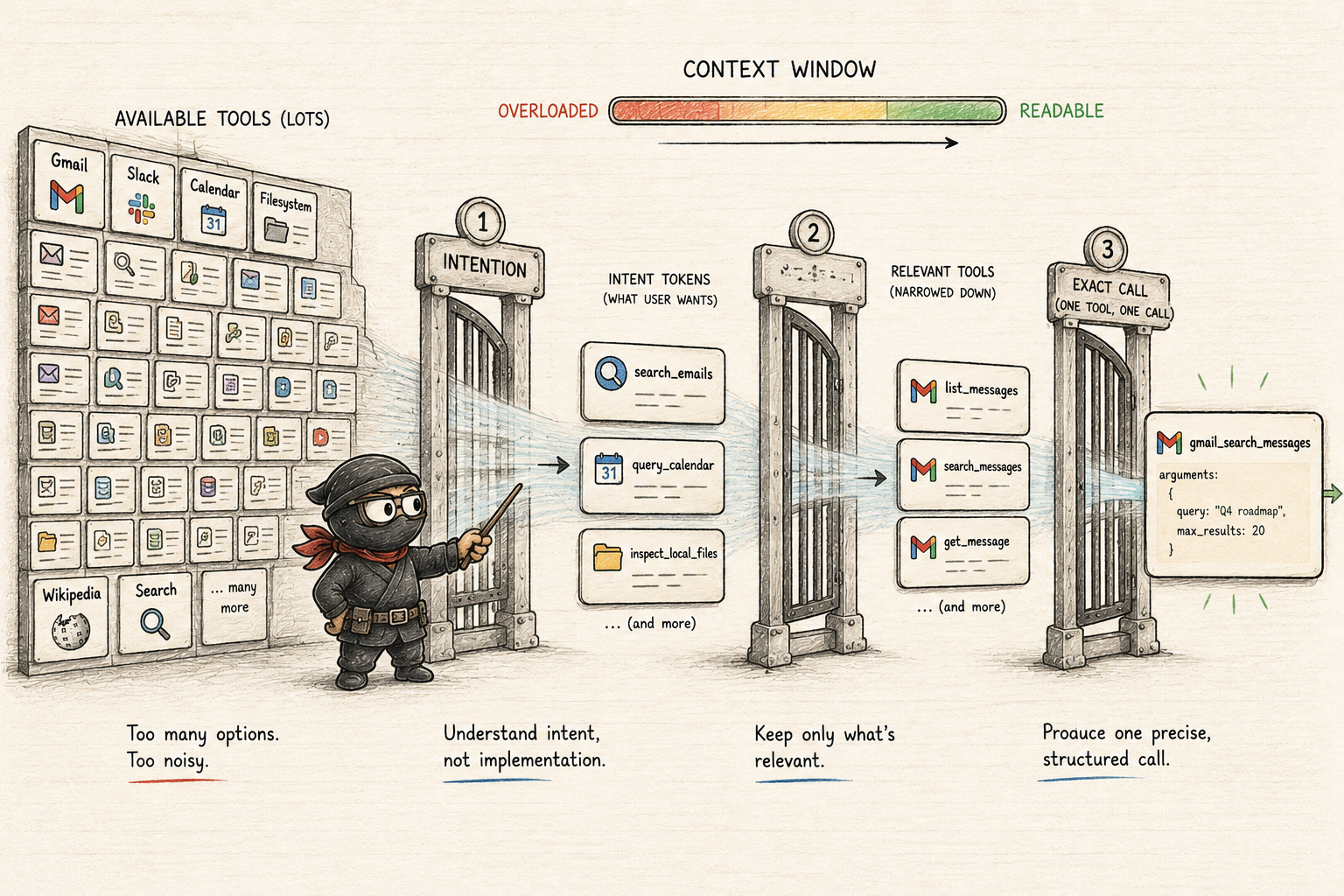
The lighter abstraction is to expose intentions first:
{
  "available_intents": [
    { "intent": "search_emails", "policy": "read_only" },
    { "intent": "query_calendar", "policy": "read_only" },
    { "intent": "inspect_local_files", "policy": "read_only" },
    { "intent": "search_slack", "policy": "read_only" }
  ]
}
Now the LLM can answer the first routing question without seeing the full Gmail, Slack, Calendar, and filesystem manifests. For a user request like “show me the latest three emails”, the model can emit a narrow structured intention:
{
  "intent": "search_emails"
}
The host-side harness then maps that intention to the relevant MCP server and exposes only the small tool subset needed for the next model decision:
{
  "available_tools": [
    {
      "name": "gmail_list_messages",
      "arguments": {
        "max_results": "number",
        "query": "string"
      }
    },
    {
      "name": "gmail_get_thread",
      "arguments": {
        "thread_id": "string"
      }
    }
  ]
}
Only then does the model choose the exact callable function:
{
  "tool": "gmail_list_messages",
  "arguments": {
    "max_results": 3,
    "query": "newer_than:1d"
  }
}
That is the staged narrowing process. The LLM owns intention identification. The harness owns mapping, policy, approval, execution, audit, and evidence shaping. The MCP server owns the provider-specific call shape.
If a write action appears in the middle of that flow, the harness should pause for preview and approval before execution. The point is not to make the model timid. The point is to keep the model’s search space small while keeping side effects under product control.
Some systems expose all tools directly to the model. For a small demo or a tiny tool ecosystem, that is reasonable. It is simpler, has fewer orchestration steps, and avoids another round trip.
But as the tool ecosystem grows, that simplicity stops being free.
If the model sees hundreds of tools and thousands of schema fields, the context window becomes a dumping ground. The practical answer is hierarchical exposure: choose intention from a small set, expose only the relevant tool subset, then generate the exact structured call.
Docker MCP Toolkit Is A Manager, Not The Trust Model
This is where my own work made the lesson concrete.
I have been working on a local AI-first solution, and one of the practical questions was how external tools should appear without making the user paste transport commands into a form like a punishment.
The first time the boundary became obvious, the UI could see more than the runtime was willing to use. A manager profile could show external capabilities. A tools page could display them. But that did not mean the model should immediately receive every function behind that profile.
That felt annoying at first, because it made the product look less “connected” than the setup technically was. But the annoyance was useful. It forced the distinction I had been missing.
Docker Desktop’s MCP Toolkit is useful here because it gives a manager-like UI around catalogs, profiles, containers, gateway behavior, and credential support. Docker’s own docs describe the catalog as a curated collection of MCP servers and the gateway as a proxy that handles server lifecycle, routing, and authentication across profiles.
That is useful plumbing.
But it is still plumbing.
The host-side harness still has to decide what enters the model-visible manifest.
For example, a Docker MCP profile may make Wikipedia, Gmail, and Slack visible. The host-side harness may still choose a much narrower runtime posture:
- Wikipedia: available and routed, because the enabled functions are read-only.
- Gmail: available, but not routed until account authorization, scopes, and read-only policy are clear.
- Slack: available, but write-capable functions stay blocked until approval flows exist.
This is the distinction I care about most:
Available is not the same as routed.
Routed is not the same as approved.
Once that clicked, MCP stopped looking like a magical agent feature and started looking like a sensible extension boundary.
MCP standardizes connection.
It does not standardize judgment.
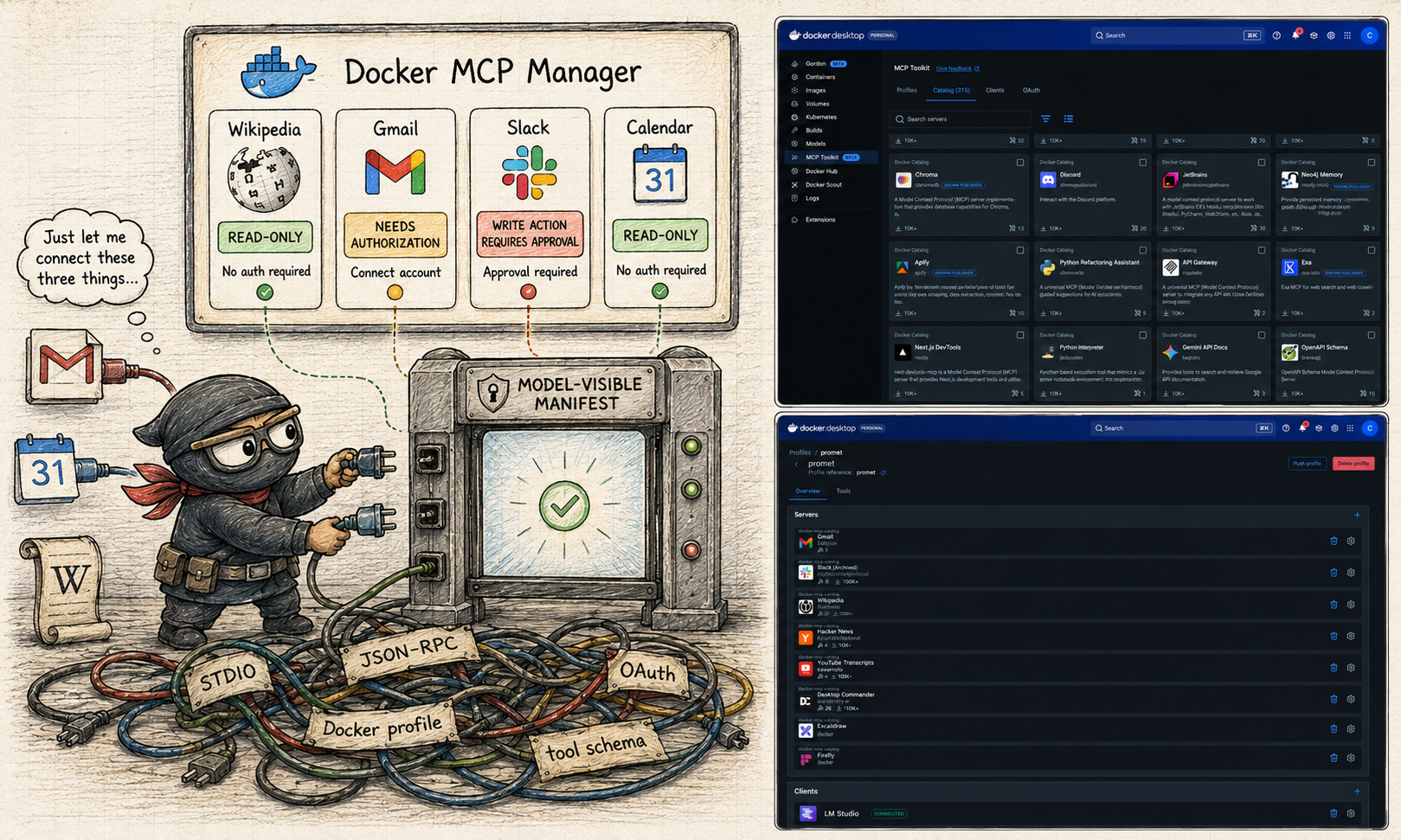
If you want the terminal version of creating a Docker MCP profile, assigning catalog servers, and registering the gateway with a client, I moved that into a small companion reference: Docker MCP Toolkit profile setup.
The product point remains the same: a profile registers servers with Docker MCP. It does not make every advertised function safe to route into the model.
Read-Only Is Not A Vibe
One of the fastest ways to make an assistant feel impressive is to let it touch personal tools.
One of the fastest ways to make it untrustworthy is to blur read and write behavior.
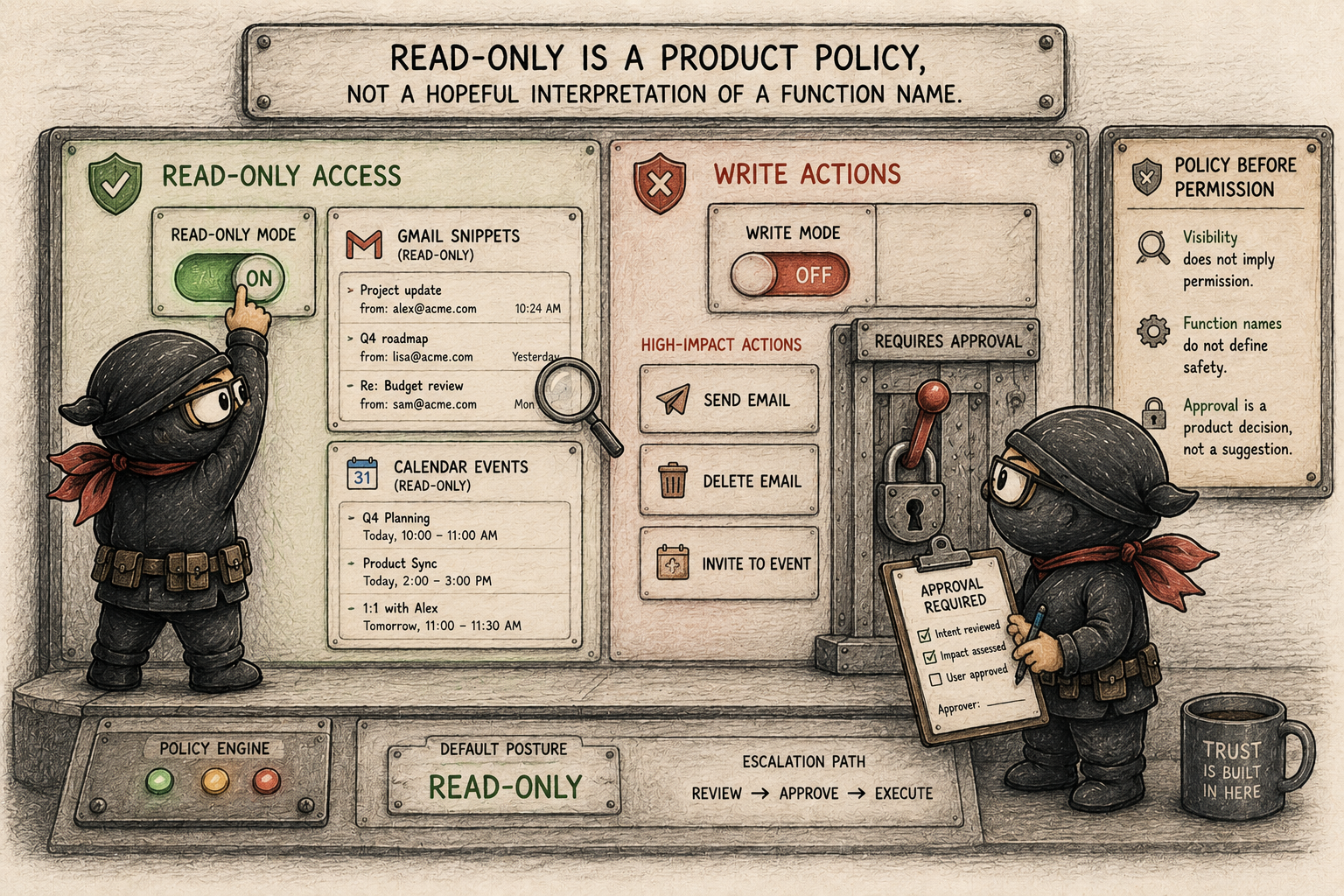
The same Gmail server can make the distinction obvious. “Summarize my unread email from this morning” is a read path. The MCP server knows how to talk to Gmail, but the host-side harness still decides whether the Gmail functions are visible, which result fields come back, and what gets recorded.
“Reply to Alex and say I will be ten minutes late” is a different class of action. The system should compose a draft, show the recipient and exact text, wait for approval, and only then send. If the same path treats search and send as merely two advertised functions, the architecture has already lost the important distinction.
I would start with read-only actions:
- Gmail: search messages, list labels, fetch snippets.
- Calendar: list events, check free/busy, show calendar names.
- Wikipedia: search, get summaries, fetch article metadata.
I would hold back actions that change the world:
- Gmail: send email, delete email, forward attachment.
- Calendar: create events, update events, invite attendees, cancel meetings.
- Slack: post messages, react, invite users.
Those actions need previews, approvals, audit records, and revocation. They should not become available merely because a server advertises them.
The same applies to evidence.
If a Wikipedia connector returns a title and URL, that can be cited as Wikipedia evidence. If a Gmail connector returns a message subject, the system should not invent a public source URL because some generic normalizer once did that for Wikipedia. Helpful fallbacks become false provenance when they are applied globally.
This is where the boring engineering matters.
Fail closed when a function is ambiguous. Keep credentials out of prompts. Do not route write actions before the approval path exists. Do not turn private snippets into fake citations. Keep the audit trail local and explicit.
This is not fear. It is interface discipline.
This is also how I think about local AI-first systems. Local-first does not have to mean offline-only. Gmail, Slack, Calendar, and Search may still be external APIs. The important part is that credentials stay out of prompts and logs, approval state and audit records remain under the user’s control, and the host-side harness decides what evidence reaches the model.
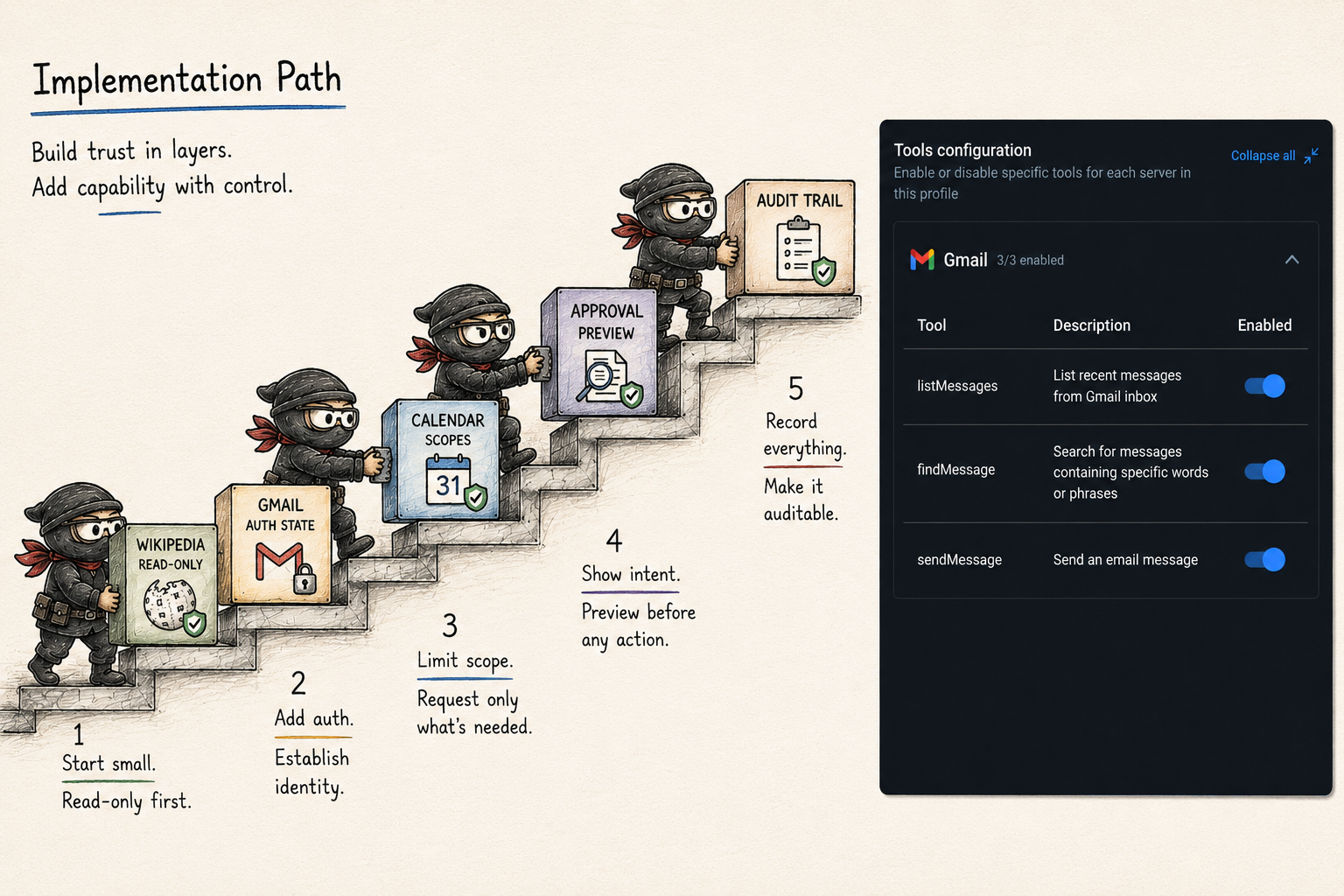
Where I Would Start
For a practical local assistant, I would not start by connecting every personal tool and hoping policy catches up.
I also would not force MCP into every experiment. If one application needs two provider calls and the integration is unlikely to be reused, a direct API integration can be simpler and perfectly defensible.
MCP starts paying for itself when the same capability needs to serve several AI applications, when a provider workflow should be hidden behind a stable tool contract, or when dumping raw API documentation into model context becomes the bottleneck.
I would start narrower:
- connect one public, read-only server such as Wikipedia
- show the discovered functions grouped under one user-facing tool
- route only functions with explicit read-only metadata
- record tool calls and compact evidence
- add Gmail or Calendar read-only after authorization and scope display are clear
- add write actions only after preview, approval, audit, and disable paths are real
That order is slower than a demo.
It is also much closer to something I would trust.
The uncomfortable part is that responsible MCP adoption can look unimpressive at first. A profile may show ten exciting tools, while the assistant only routes one public read-only connector. That looks cautious because it is cautious.
But the alternative is worse: a system that confuses discovery with permission, then discovers the trust model only after private data or side effects are already in the path.
Closing Thoughts
MCP makes much more sense to me when I stop treating it as an agent feature and start treating it as an integration standard.
It is not the assistant. It is not the model runtime or provider. It is not the safety model. It is not the product UI. It is not the approval system.
It is the protocol that lets an AI host discover and call external capabilities in a more standard way.
That is already enough.
For one application and one small provider surface, direct API code may still be the right answer. For repeated capabilities across clients, MCP is how you stop every client from becoming its own integration platform.
The real product work starts after discovery: deciding what should be visible, what should be routed, what should require approval, what evidence should return, and what must never enter the prompt in the first place.
That is why I now find MCP interesting.
Not because it removes the hard parts, but because it gives the hard parts a cleaner place to live.